I just recently upgraded from AT2, and one thing I can’t figure out how to do is to get the new version to just show me the age of a character on the event itself. It’s really difficult to drag and check ages when I’m working in centuries+ sometimes when it comes to my writing. Any help would be appreciated.
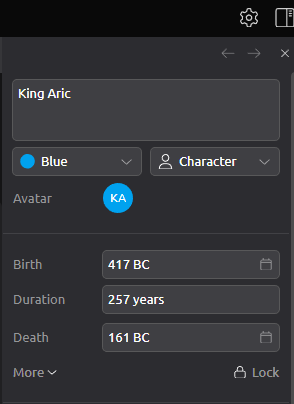
If you set a birthday/ death if applicable then will see age in inspector info. Not on computer but may be an option to display on timeline. Check timeline card in footer of program .
Hi there,
Welcome to Aeon Timeline 3, and thank you for your question.
At the moment, character ages are not displayed directly on events in the Timeline view.
The closest equivalent is the Relationships view, which you can add to your project. The example below is from our Worldbuilding template using the Event Relationships view. In this view, ages are displayed alongside character relationships, making it easier to see how old a character is at each event without needing to inspect the event individually.

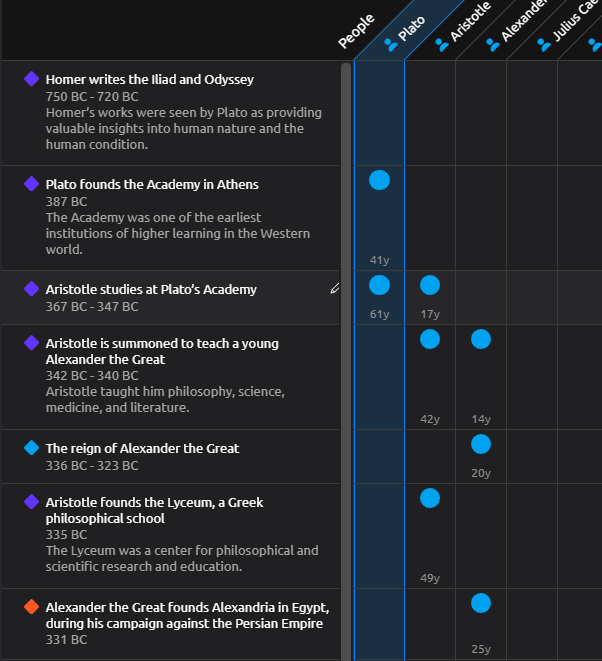
You can also try out the Worldbuilding template yourself to see how this view is configured.
Additionally, age information can be viewed in the Inspector when viewing characters and their relationships.
We understand that having ages visible directly on events in the Timeline view could be particularly useful when working with long timelines spanning decades or centuries, and we’d be happy to pass that through as feature feedback.
If you have any questions or require further assistance, please feel free to contact us again.
Kind regards,
Riaan