Is there a way to hide years that have no timeline data to them?
You can filter timeline by date but is a window from date a to date B (continous). Now could do a split view and have a different date window if the empty years were between two date windows.
Another trick might be bookmarks where you can bookmark dates and click the target icon to move to the date. So you can jump around a widely spaced timeline to active areas of your story. I have a 300 year gap in my story see image below.

Hi,
Currently, there isn’t a way to automatically hide years or “skip over” periods on the timeline that don’t contain any events.
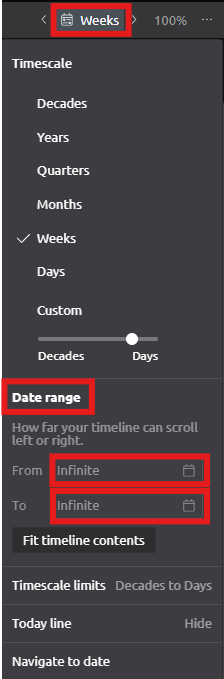
If you’d simply like to focus on a particular period of your project, you can limit the visible date range using the Timescale button (calendar icon) in the top-right corner of the Timeline view.
Steps
- Click the Timescale button (calendar icon) in the top-right corner of the Timeline view.
- Select Date Range.
- Enter a From and/or To date.
- You can type the dates manually, or click the calendar icon to choose them from the date picker.
- Click Done.
Screenshot
If your goal is to collapse long empty periods while still displaying events before and after them, that isn’t currently supported. However, if you have a different workflow in mind, let us know and we’d be happy to discuss it further.