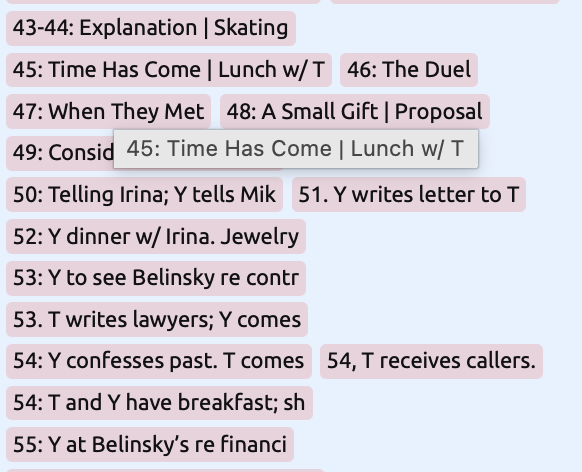
My Timeline has turned into a list – can’t scroll R-L/L-R. Can’t find a setting to fix this. Please advise.
Hi,
Thanks for reaching out.
From your screenshot, it looks like one of a couple of different settings may have changed.
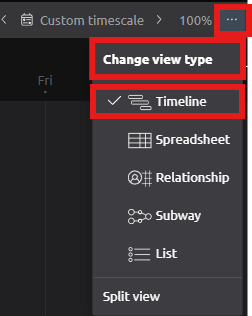
Option 1 – Check you’re using Timeline View
If you’ve accidentally switched to another view, you can change back to Timeline View:
-
Click the … button in the top-right of the view header.
-
Select Timeline.
Option 2 – Check the information displayed on the Timeline
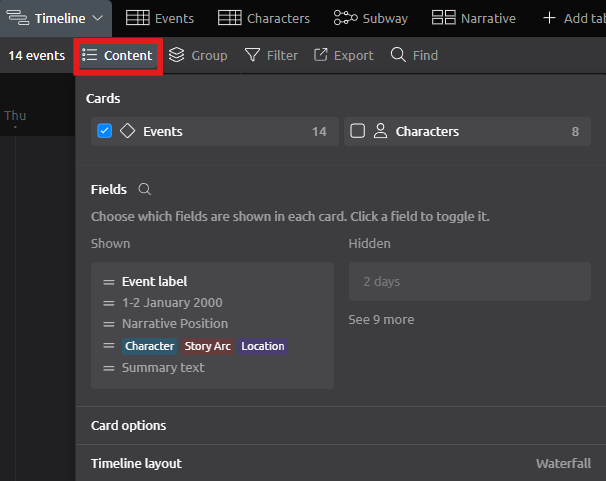
If your Timeline is displaying more information than expected, you can choose which fields are shown on each timeline card.
-
Click Content.
-
Under Fields, review the fields that are currently enabled.
-
Click any field to show or hide it from the timeline cards as required.
If neither of these resolves the issue, please email a copy of your timeline file to support@aeontimeline.com, and we’ll be happy to investigate it further.
Solved, thanks for the pointer to what was wrong:
In Timeline View, when I clicked on Content there were several things checked. I unchecked everything but Event, and the normal Timeline appeared again.
I need to look up “Cards” – have never used that feature, and don’t know how anything except Events were checked.
Grateful for your quick help.
June Hiatt