Hi there,
Thanks for the thoughtful feedback - I think this is a really good idea, especially for users who prefer working from the Events view rather than the graphical Timeline view.
At the moment, Aeon Timeline doesn’t currently support automatic date grouping in the Events view in the way you described (for example, automatically generated YEAR - MONTH - events sections). The closest workaround is the nested structure you’ve already started experimenting with.
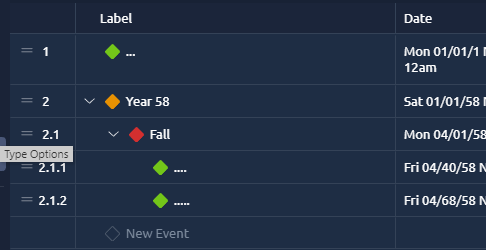
From your screenshot, it looks like you’re essentially using nested items as organisational “date headers” rather than as true parent events.
What you’re seeing with the date changes is expected behaviour for nested items. Parent items can have a wider date range than their child items, but they cannot be narrower than the events inside them. By default, parent item dates automatically adjust to encompass their child items, so adding or moving events underneath them will also update the parent dates.
There is also a behaviour where, if a parent and child item currently have matching dates, moving the child later can cause the parent to “snap” and move with it. If that sounds like the behaviour you’re seeing, let us know, as there are a few workflow approaches we can suggest to help avoid constantly needing to adjust the parent dates back manually.
It is possible to lock the parent dates to stop them from automatically changing. However, when locked, child items can no longer exist outside of the parent item’s date range.
Because of this, using nested items as static Year/Month headers can become a little awkward, as the hierarchy system is primarily designed around event relationships and date containment rather than purely visual grouping.
If you’d like, you’re welcome to send through a copy of the timeline file you’re experimenting with so we can take a closer look at the structure and see whether there may be a cleaner workaround for what you’re aiming to achieve. You can either attach it here or email it to support@aeontimeline.com if you’d prefer to keep the contents private.
I’ll definitely pass this feedback and your example along to the team, as I think it demonstrates the request very clearly.